April was a productive month for the Unique AI platform. Across two releases (2026.16 and 2026.18), we focused on three themes that matter most to your day-to-day work: giving you more control over the information you bring into conversations, making AI responses more transparent and trustworthy, and expanding the AI models available to your organisation. Here is what changed and why it matters.
Work with Your Files, Your Way
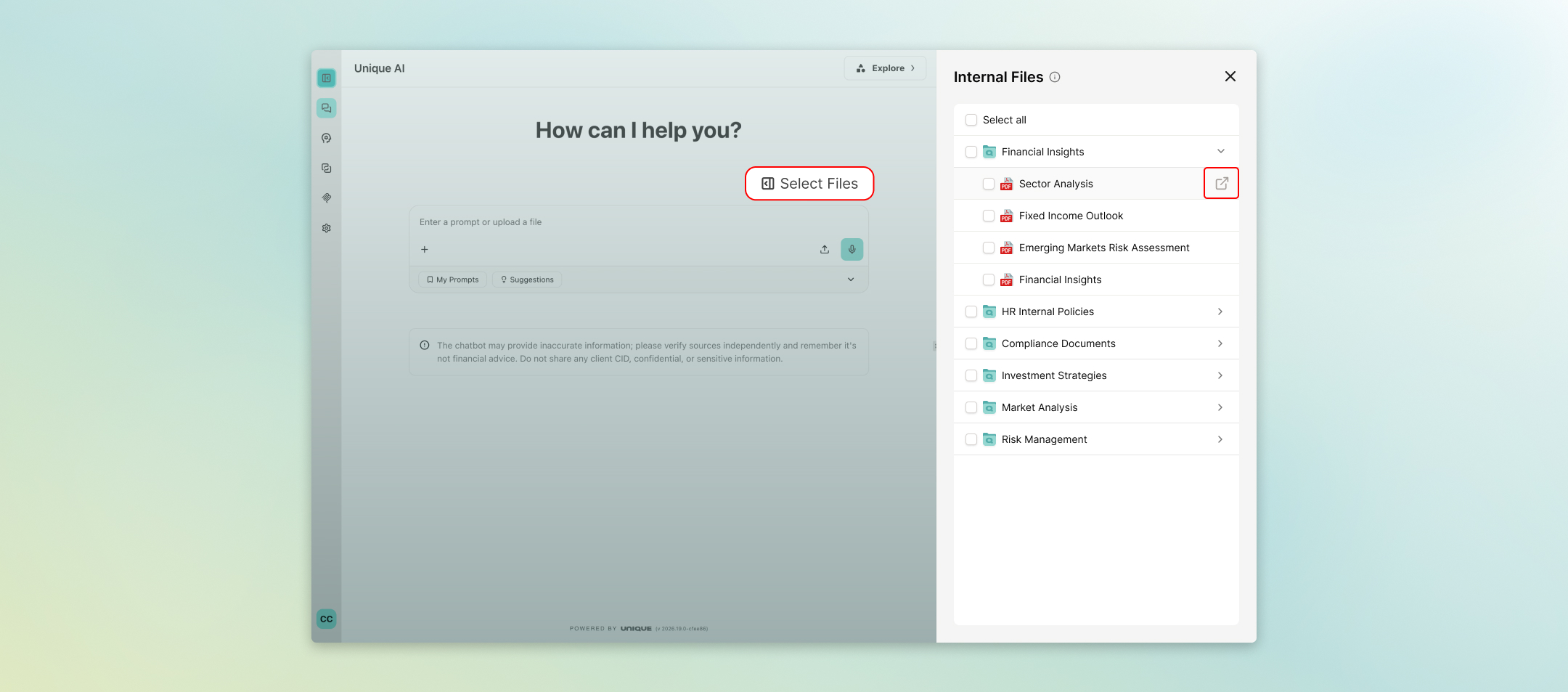
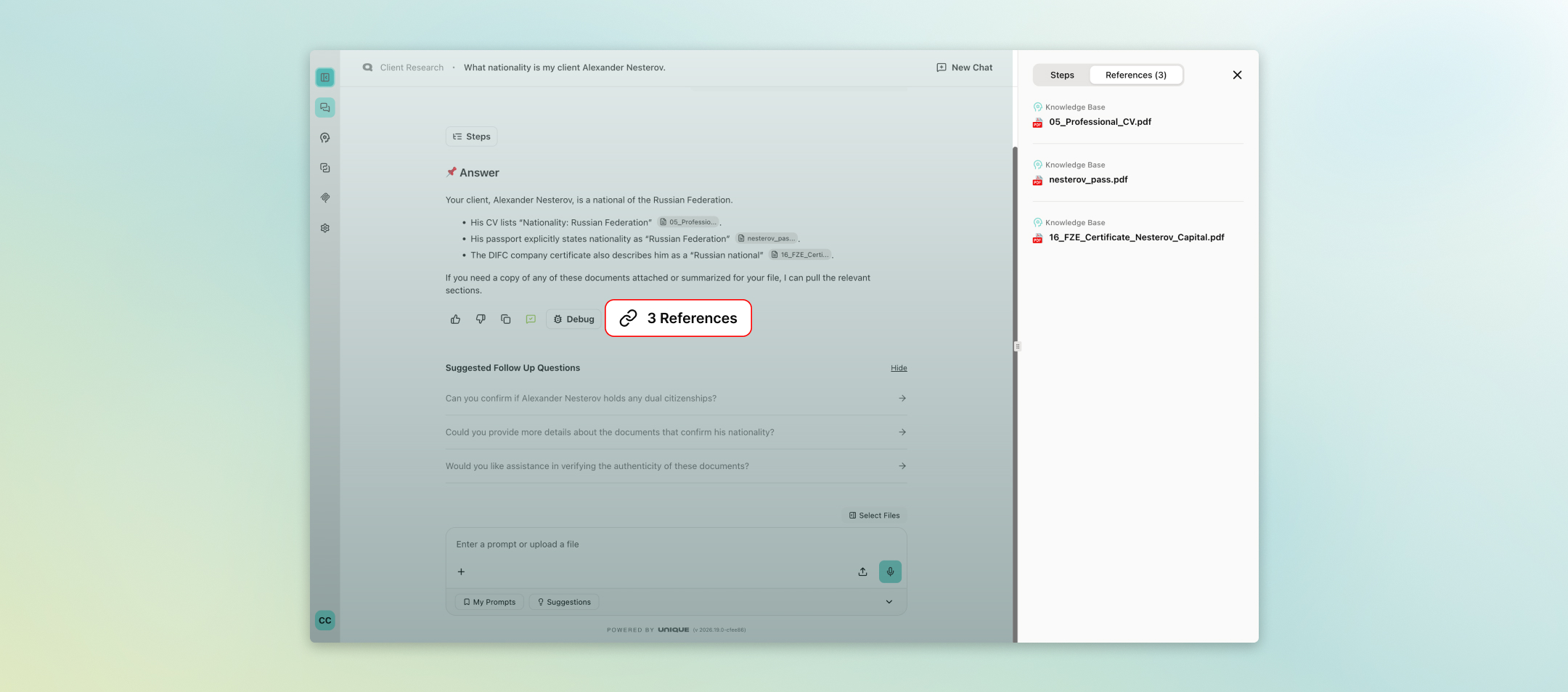
One of the most requested improvements was the ability to manage exactly which files feed into a conversation. You can now preview files directly from the 'Select Files to Chat' sidebar without having to hunt for them in the knowledge base first. If a file cannot be displayed in the browser, it downloads automatically so you are never left searching.
On top of that, a new 'Uploaded Files' tab in the chat panel lets you pick and choose which of your uploaded documents are included as context for each message. Select all, pick a few, or exclude specific files entirely — the choice is yours. This gives financial professionals a much tighter grip on the sources the AI draws from, which is essential when working with sensitive or version-controlled documents.
PowerPoint files (.pptx) are now fully recognized and rendered with the correct file icon and preview behavior, so presentations sit alongside PDFs and Word documents as first-class citizens in your workflow.
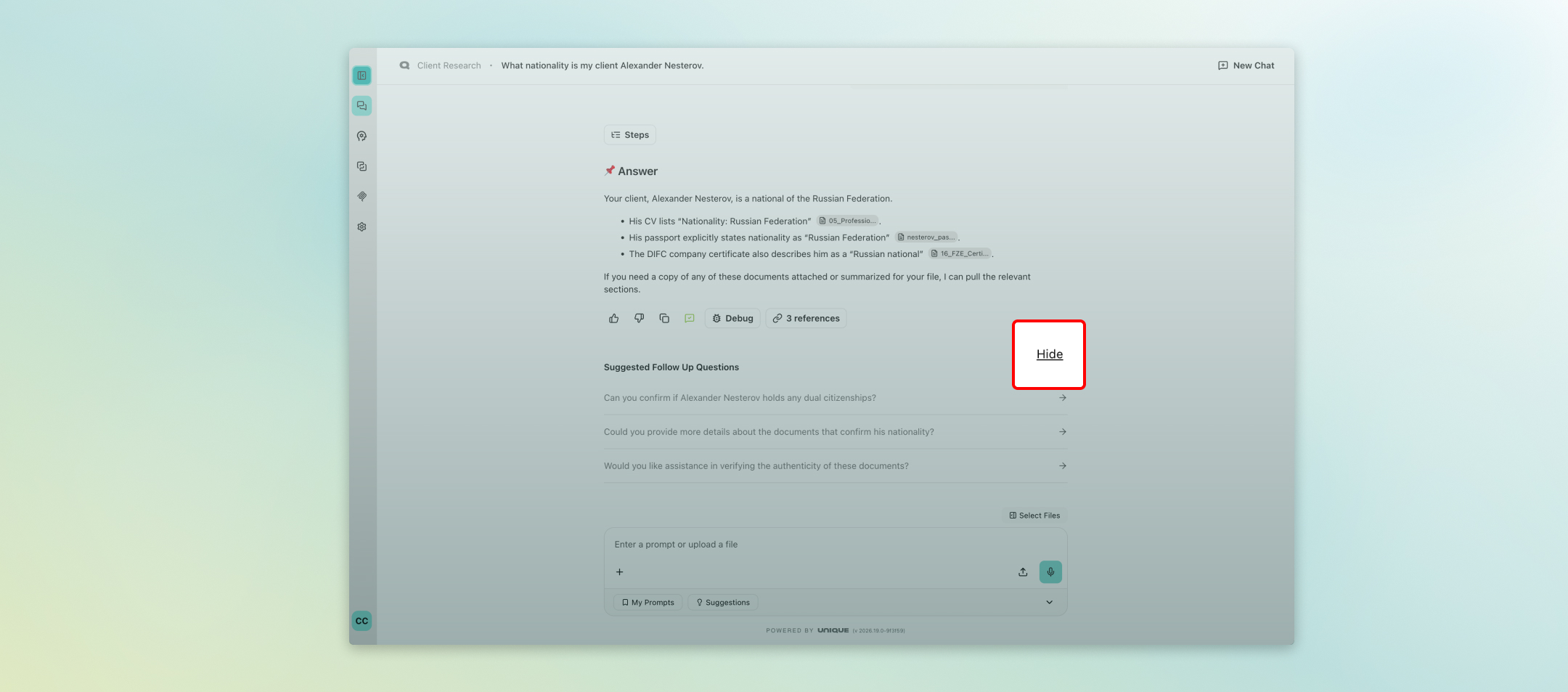
For users who prefer a cleaner, more focused workspace, suggested follow-up questions can now be hidden with a single click. The preference is saved automatically and carries over between sessions — so once you switch it off, it stays off.
Smarter, More Transparent AI Responses
Trust in AI output is non-negotiable in financial services. Two improvements in April directly address this.
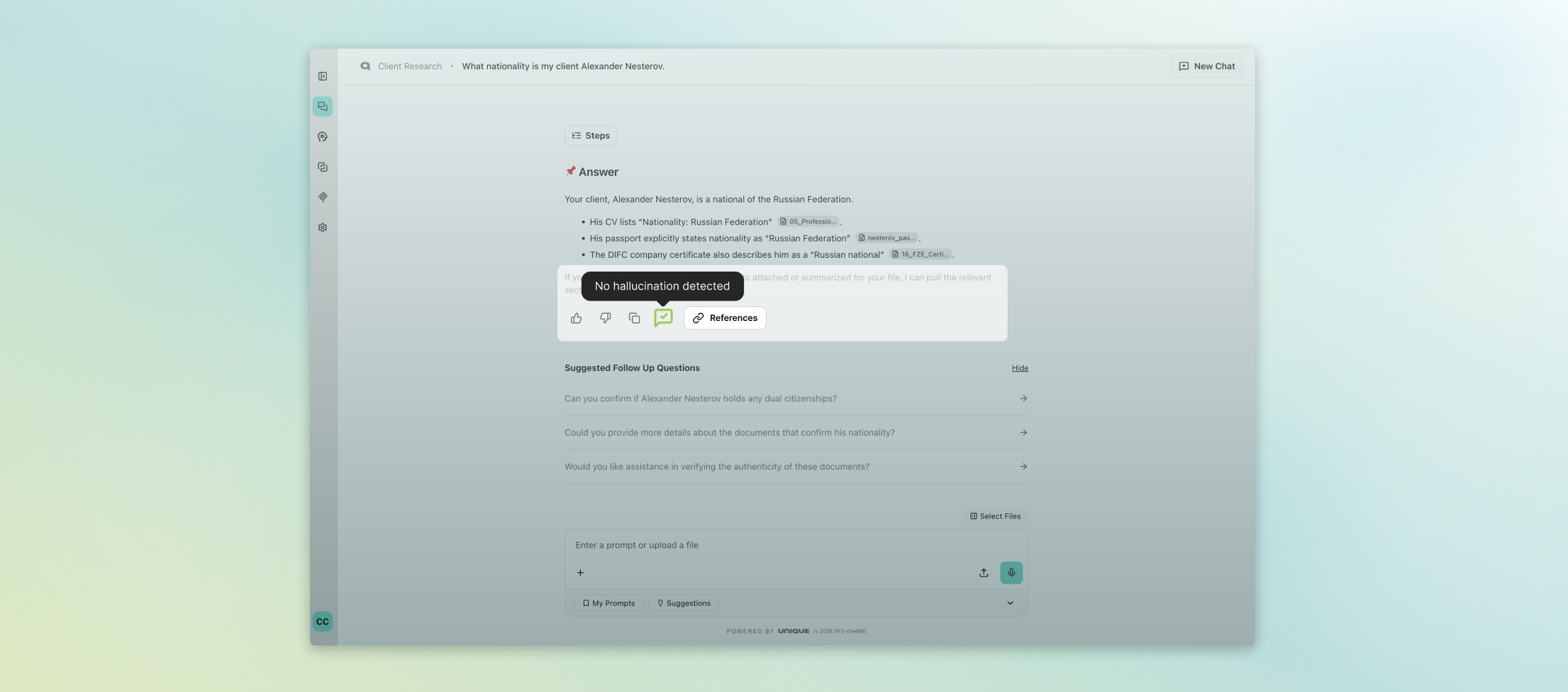
First, the hallucination check indicator has been refined: responses that pass the check now show a subtle green tick inline, while moderate or high-risk findings continue to surface as the prominent warning bubble above the chat input. The result is a cleaner interface that draws your attention only when it genuinely needs to.
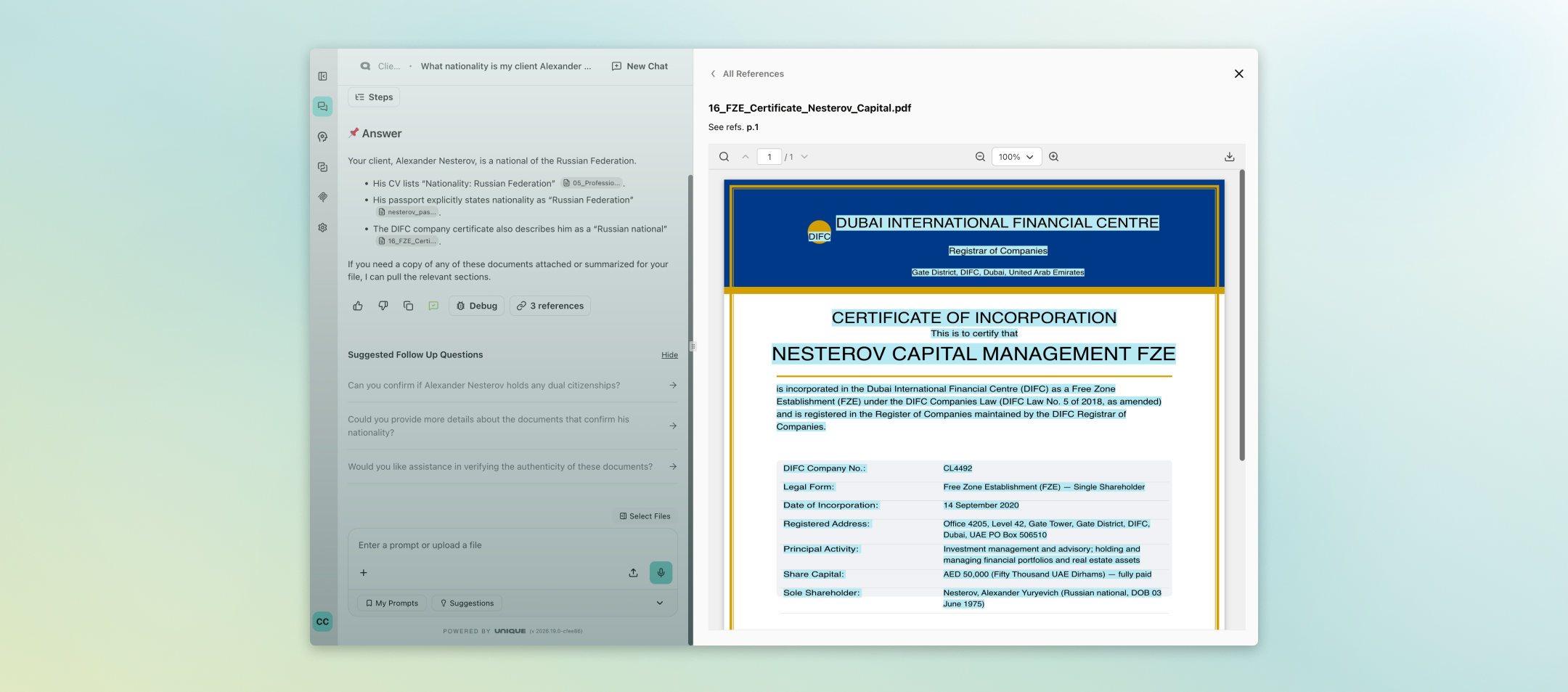
Second, the PDF source viewer now opens at 100% zoom in a wider panel by default, so referenced documents are immediately readable the moment you click through — no more manual zooming or resizing to find the passage the AI cited.
For teams using the Agentic Table to process RFP documents and structured data extraction, exports to the answer library are now significantly faster, fetching row metadata in a single batch rather than one request per row.
Deeper Insight into AI Costs and Usage
Organisations now have visibility into how AI capacity is being consumed. A new Cost Management section in the Admin Panel records every model call — input tokens, output tokens, and estimated spend in USD — broken down by user, assistant, or application. Usage can be filtered by date range and exported to CSV for offline reporting.
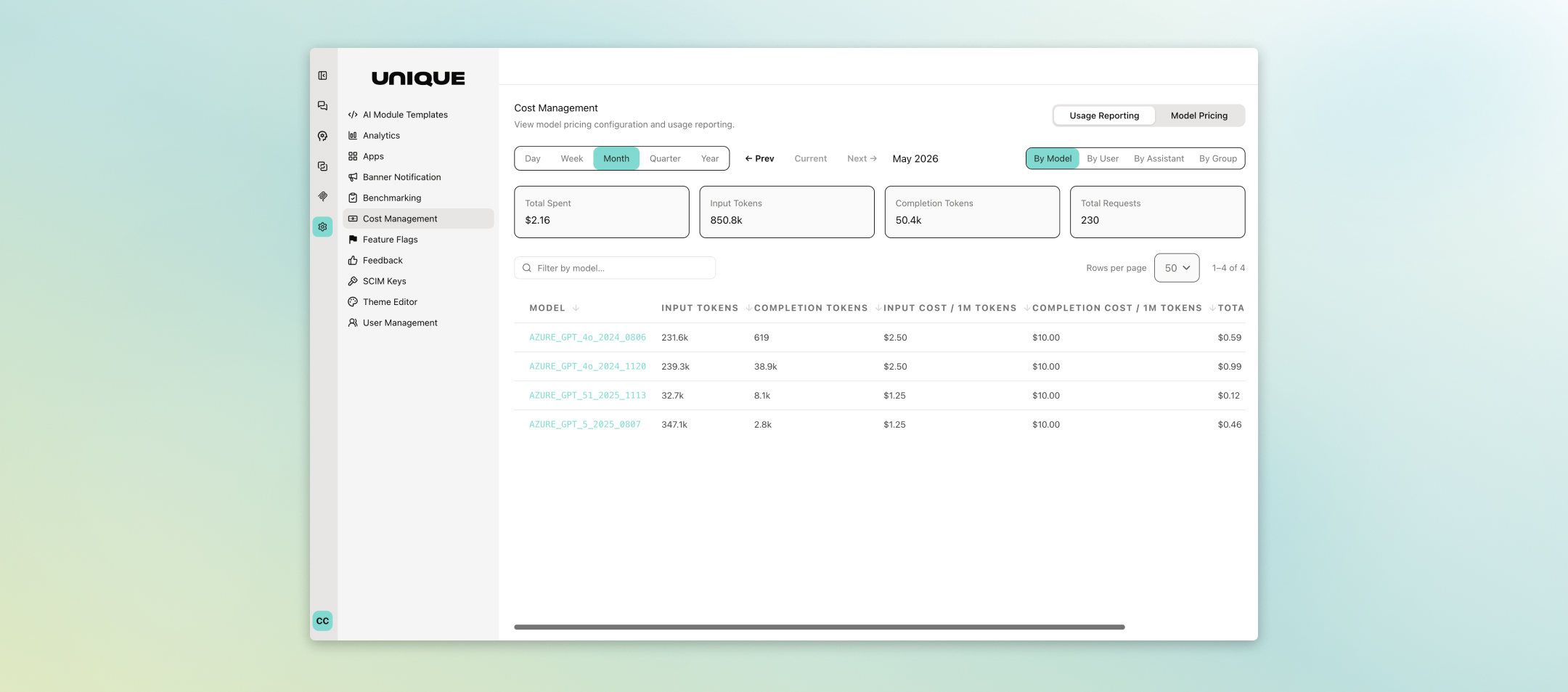
This matters for budget owners and compliance teams alike: you can see exactly which assistants are generating the most activity, identify outliers, and plan capacity with real data rather than estimates. Privacy settings such as pseudonoymisation are respected throughout.
Expanded Access to the Latest AI Models
April brought a significant expansion to the model roster available on the Unique AI platform. GPT-5.5 is now available through both Azure OpenAI and LiteLLM. Anthropic's Claude Opus 4.6 and the newly released Claude Opus 4.7 have also been added to the approved model list and will appear in the model selector for organizations that have them enabled.
Alongside these additions, all spaces previously configured to use Claude Sonnet 4 or Claude Opus 4 have been automatically migrated to their 4.6 successors, ahead of those versions being retired. No action is required on your part — your assistants continue to work as before, now running on updated models.
Reliability and Control for Platform Administrators
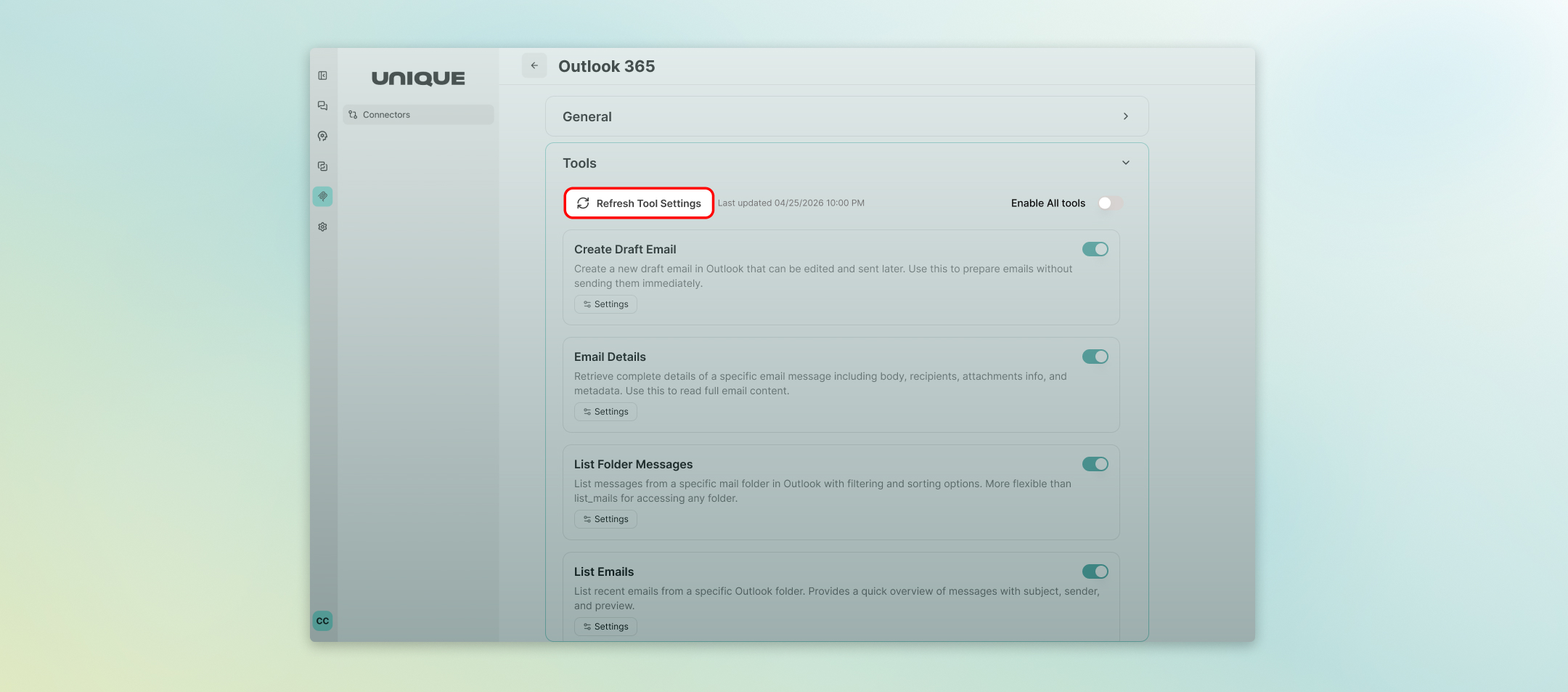
Several improvements shipped this month that matter most to the teams who manage the platform. MCP (Model Context Protocol) server administrators can now refresh tool definitions directly from the Admin Panel without disconnecting and reconnecting the server. After a refresh, a clear summary shows exactly which tools were added, updated, or made unavailable — and any tools with changed input schemas are automatically disabled pending review, so nothing breaks unexpectedly for end users.
Intelligent document ingestion also moved forward: metadata extracted by the AI is now validated field-by-field against the configured schema before being saved, preventing malformed or hallucinated values from reaching stored records. Enum constraints can now be defined for metadata fields, restricting the AI to a predefined list of values — useful for fields like document category, language, or status.
Finally, deployments now roll out gradually rather than replacing all instances at once, and users who keep the platform open during a release are prompted to reload, ensuring everyone stays on the same version.
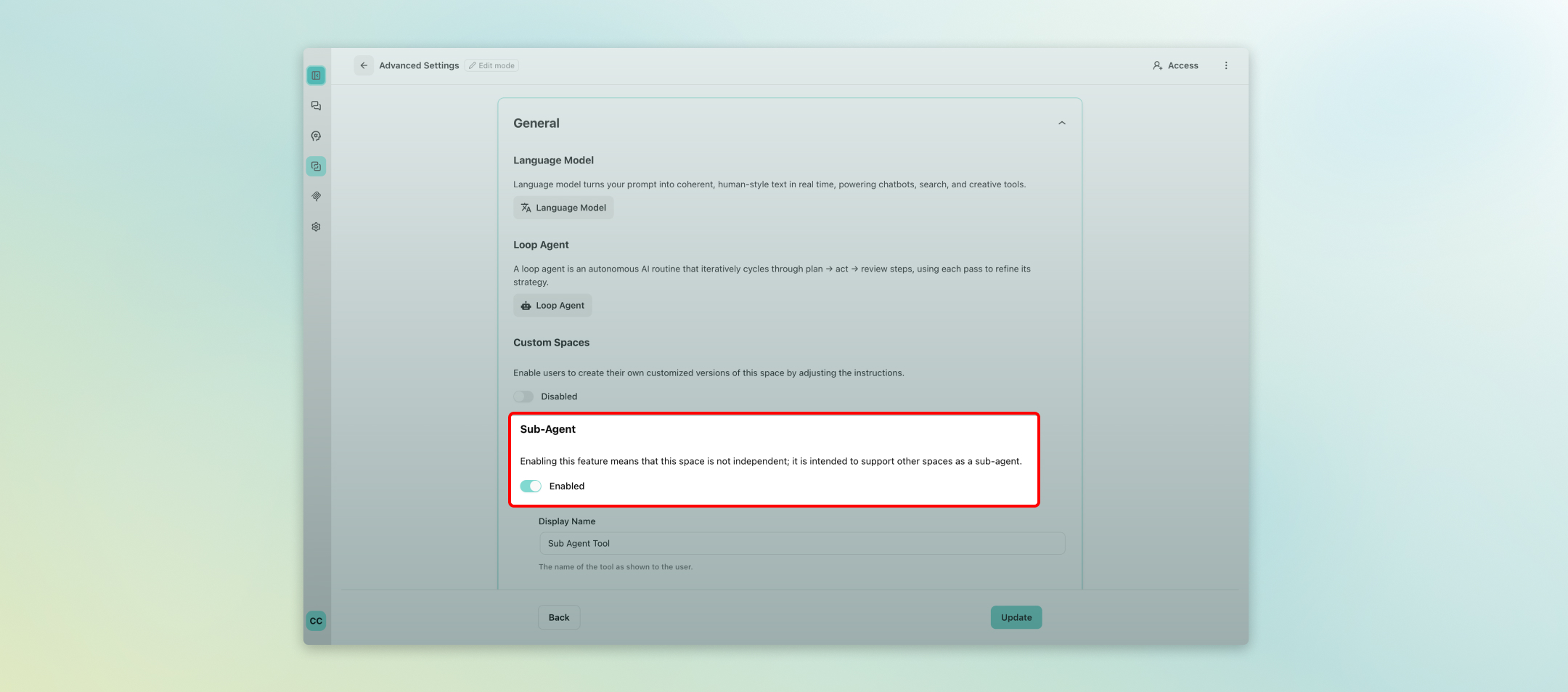
For organisations building more sophisticated AI workflows, Space 2.0 now supports sub-agent configuration. Admins can define reusable sub-agent spaces and attach them to orchestrator assistants, allowing one assistant to delegate a focused task to another pre-configured space and seamlessly incorporate the result. This makes it straightforward to compose specialised workflows — for example, routing a data extraction step to a dedicated assistant before continuing with analysis — without rebuilding logic from scratch.
These updates reflect our continued commitment to making Unique AI a platform financial professionals can rely on. One that is precise, transparent, and built around how you actually work. As always, your feedback shapes what we build next. Reach out to your customer success contact if you would like to explore any of these features in more depth.

Unique AI Release Notes: April 2026
April was a productive month for the Unique AI platform. Across two releases (2026.16 and 2026.18), we focused on three themes that matter most to your day-to-day work: giving you more control over the information you bring into conversations, making AI responses more transparent and trustworthy, and expanding the AI models available to your organisation. Here is what changed and why it matters.
Work with Your Files, Your Way
One of the most requested improvements was the ability to manage exactly which files feed into a conversation. You can now preview files directly from the 'Select Files to Chat' sidebar without having to hunt for them in the knowledge base first. If a file cannot be displayed in the browser, it downloads automatically so you are never left searching.
On top of that, a new 'Uploaded Files' tab in the chat panel lets you pick and choose which of your uploaded documents are included as context for each message. Select all, pick a few, or exclude specific files entirely — the choice is yours. This gives financial professionals a much tighter grip on the sources the AI draws from, which is essential when working with sensitive or version-controlled documents.
PowerPoint files (.pptx) are now fully recognized and rendered with the correct file icon and preview behavior, so presentations sit alongside PDFs and Word documents as first-class citizens in your workflow.
For users who prefer a cleaner, more focused workspace, suggested follow-up questions can now be hidden with a single click. The preference is saved automatically and carries over between sessions — so once you switch it off, it stays off.
Smarter, More Transparent AI Responses
Trust in AI output is non-negotiable in financial services. Two improvements in April directly address this.
First, the hallucination check indicator has been refined: responses that pass the check now show a subtle green tick inline, while moderate or high-risk findings continue to surface as the prominent warning bubble above the chat input. The result is a cleaner interface that draws your attention only when it genuinely needs to.
Second, the PDF source viewer now opens at 100% zoom in a wider panel by default, so referenced documents are immediately readable the moment you click through — no more manual zooming or resizing to find the passage the AI cited.
For teams using the Agentic Table to process RFP documents and structured data extraction, exports to the answer library are now significantly faster, fetching row metadata in a single batch rather than one request per row.
Deeper Insight into AI Costs and Usage
Organisations now have visibility into how AI capacity is being consumed. A new Cost Management section in the Admin Panel records every model call — input tokens, output tokens, and estimated spend in USD — broken down by user, assistant, or application. Usage can be filtered by date range and exported to CSV for offline reporting.
This matters for budget owners and compliance teams alike: you can see exactly which assistants are generating the most activity, identify outliers, and plan capacity with real data rather than estimates. Privacy settings such as pseudonoymisation are respected throughout.
Expanded Access to the Latest AI Models
April brought a significant expansion to the model roster available on the Unique AI platform. GPT-5.5 is now available through both Azure OpenAI and LiteLLM. Anthropic's Claude Opus 4.6 and the newly released Claude Opus 4.7 have also been added to the approved model list and will appear in the model selector for organizations that have them enabled.
Alongside these additions, all spaces previously configured to use Claude Sonnet 4 or Claude Opus 4 have been automatically migrated to their 4.6 successors, ahead of those versions being retired. No action is required on your part — your assistants continue to work as before, now running on updated models.
Reliability and Control for Platform Administrators
Several improvements shipped this month that matter most to the teams who manage the platform. MCP (Model Context Protocol) server administrators can now refresh tool definitions directly from the Admin Panel without disconnecting and reconnecting the server. After a refresh, a clear summary shows exactly which tools were added, updated, or made unavailable — and any tools with changed input schemas are automatically disabled pending review, so nothing breaks unexpectedly for end users.Intelligent document ingestion also moved forward: metadata extracted by the AI is now validated field-by-field against the configured schema before being saved, preventing malformed or hallucinated values from reaching stored records. Enum constraints can now be defined for metadata fields, restricting the AI to a predefined list of values — useful for fields like document category, language, or status.
Finally, deployments now roll out gradually rather than replacing all instances at once, and users who keep the platform open during a release are prompted to reload, ensuring everyone stays on the same version.
For organisations building more sophisticated AI workflows, Space 2.0 now supports sub-agent configuration. Admins can define reusable sub-agent spaces and attach them to orchestrator assistants, allowing one assistant to delegate a focused task to another pre-configured space and seamlessly incorporate the result. This makes it straightforward to compose specialised workflows — for example, routing a data extraction step to a dedicated assistant before continuing with analysis — without rebuilding logic from scratch.
These updates reflect our continued commitment to making Unique AI a platform financial professionals can rely on. One that is precise, transparent, and built around how you actually work. As always, your feedback shapes what we build next. Reach out to your customer success contact if you would like to explore any of these features in more depth.