Releases 2026.20 and 2026.22 bring a meaningful set of improvements to the Unique AI platform this month. Three themes stand out: a redesigned chat experience that makes daily work faster and easier to navigate, new smarter data-handling capabilities that reduce manual effort across files and structured tables, and important platform infrastructure upgrades that keep the platform secure, fast, and future-ready.
A Refreshed Chat Experience — Cleaner, Faster, More Intuitive
The most visible change this month is a comprehensive UI refresh of the Chat interface, which is now generally available. The new layout has been designed with one goal in mind: getting answers faster with less friction. The welcome screen greets you with a simple “How can I help you?” prompt, removing visual clutter so you can focus on your question right away.
.jpg?width=980&height=432&name=Mai%2026%20-%20How%20can%20I%20help%20you_%20(1).jpg)
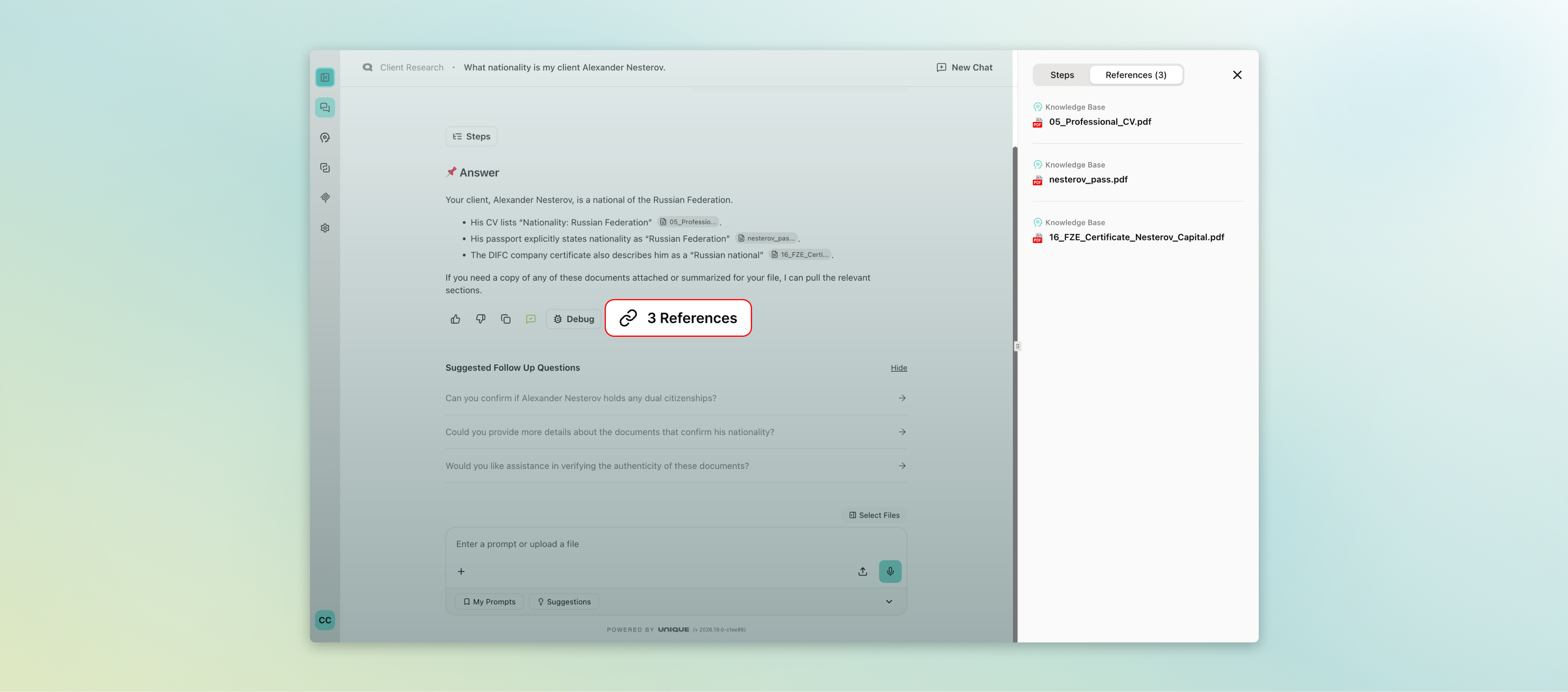
Conversations are now easier to read at a glance. Your messages appear as a bubble on the right; AI responses remain flat on the left — a familiar, natural question-and-answer flow. Sources and file references now appear as compact, clickable badges directly below each answer rather than as separate blocks. A single unified action row (copy, feedback, references, debug) sits below each AI response, and clicking any of these opens a side panel — so you never lose your place in the conversation.
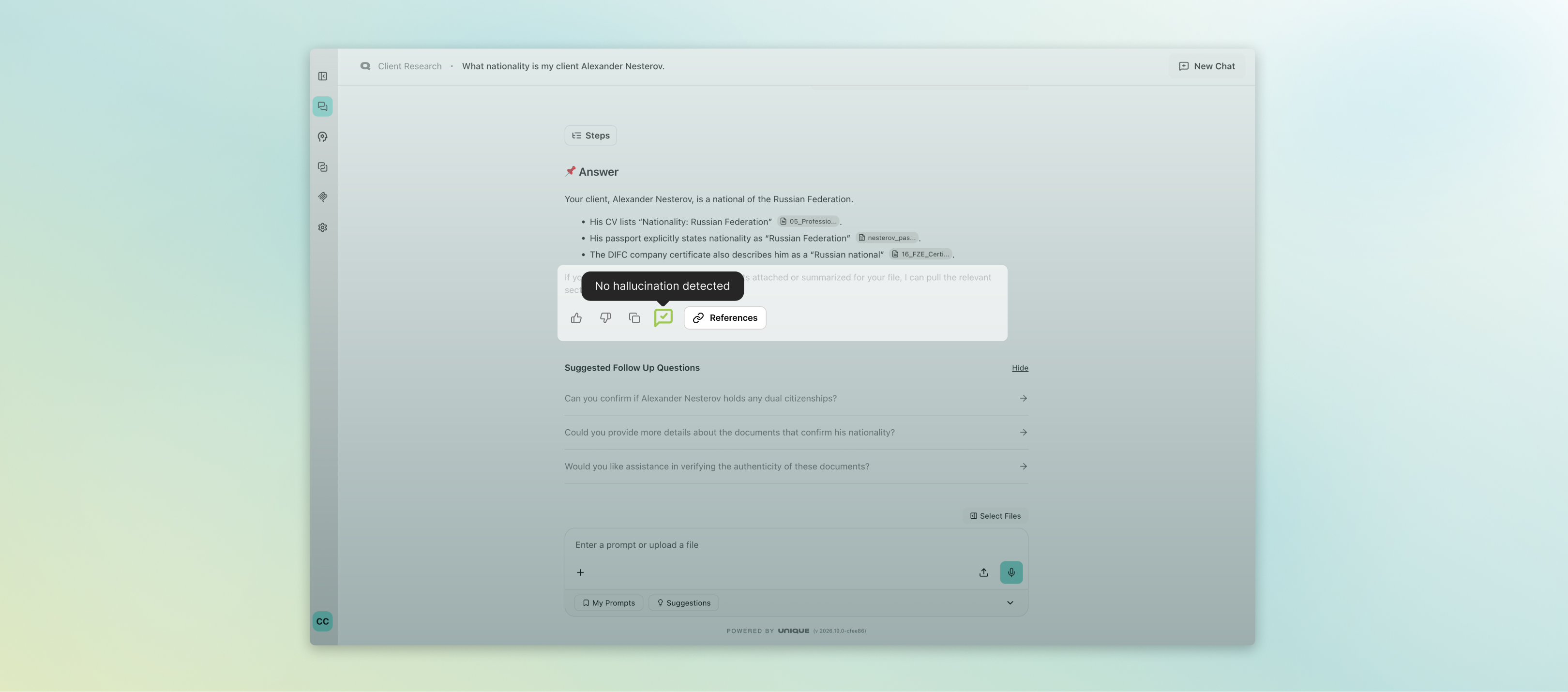
Tables in responses now include a one-click copy button, making it fast to pull data into Excel or another tool. A redesigned hallucination indicator replaces the previous Answer Assessment button: it only appears when the model flags a potential inaccuracy, floating in the lower right with a colour code (yellow for moderate, red for severe) so important warnings stay visible even as you scroll.
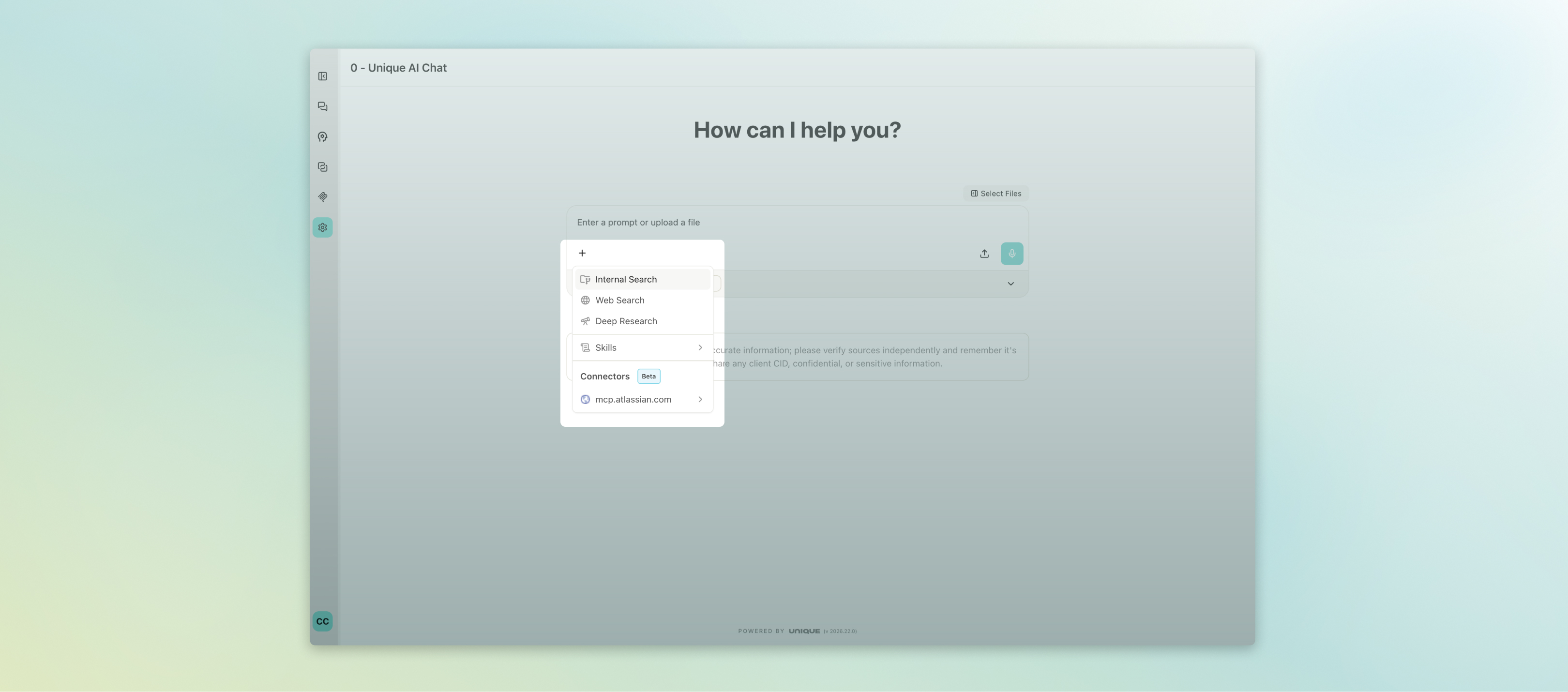
The chat input area has also been tidied up — upload, voice, and tool-selection controls are now inside the input box, and prompts are accessible from a compact bar below it. MCP tools are grouped in a "+" menu for easier navigation.
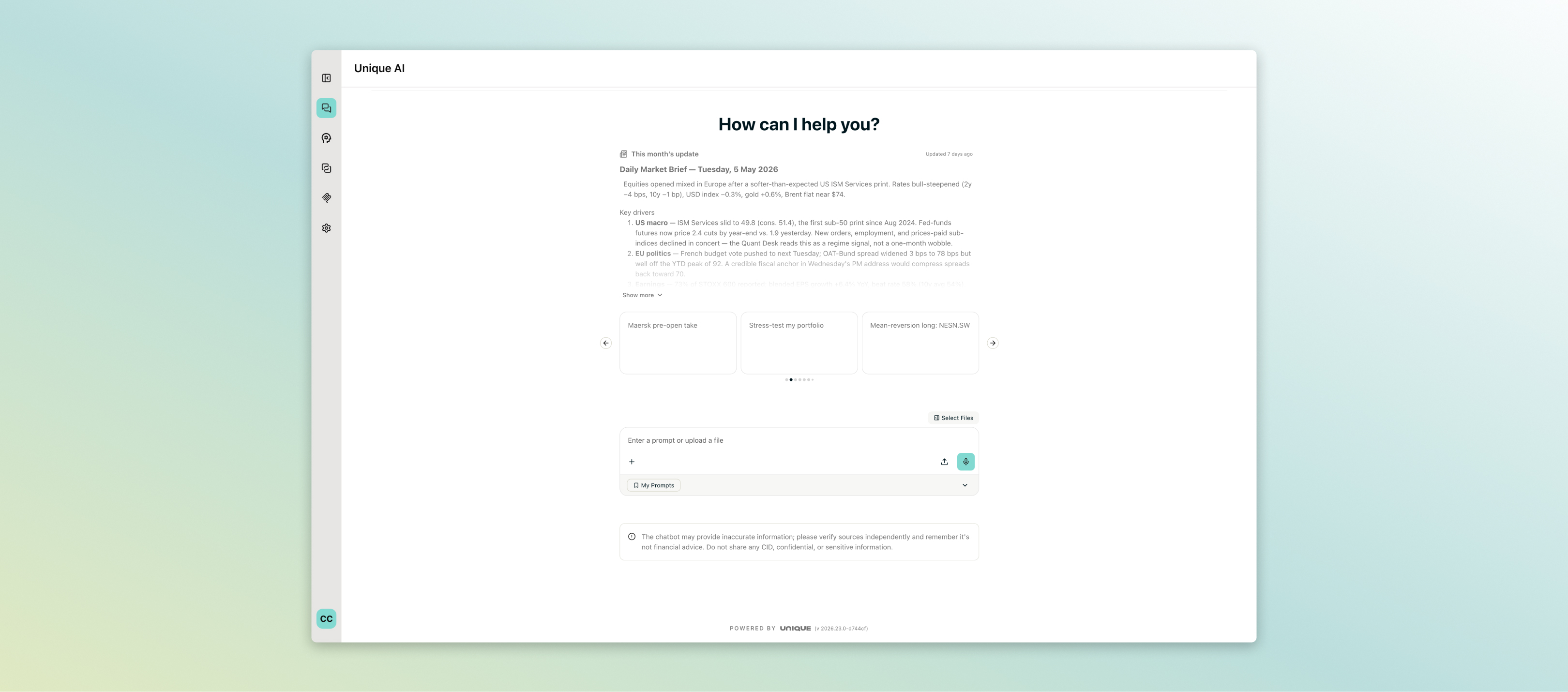
Alongside the chat refresh, a Today's Briefing feature allows AI assistants to greet users with a rich-text summary and a set of clickable suggested prompts when they open a space. This is particularly powerful for use cases where teams want to surface daily priorities or recommended next steps the moment someone logs in.
Smarter Handling of Files, Tables, and External Connections
Working with Excel and CSV files is now more intelligent. When an assistant has code execution enabled, uploaded spreadsheets are automatically routed to the code interpreter rather than the document ingestion pipeline — meaning the AI can perform calculations, filter data, and produce outputs directly, without unnecessary processing in the background.
In the Unique AI Table — the platform's structured Q&A grid used for RFPs, due diligence questionnaires, and data extraction — two improvements make working at scale more reliable. A verbatim question import mode now lets you upload a CSV or XLSX and have questions imported exactly as written, without relying on AI extraction. This is ideal for highly structured templates where wording precision matters.
Excel exports of Unique AI Tables (Beta) can now be configured to strip inline reference markers (such as [1], [2]) from answer columns, delivering clean, professional output ready for sharing with clients or regulators. A bug that caused large tables (200+ rows) to display only the first 20 rows on creation has also been fixed — all rows now appear immediately.
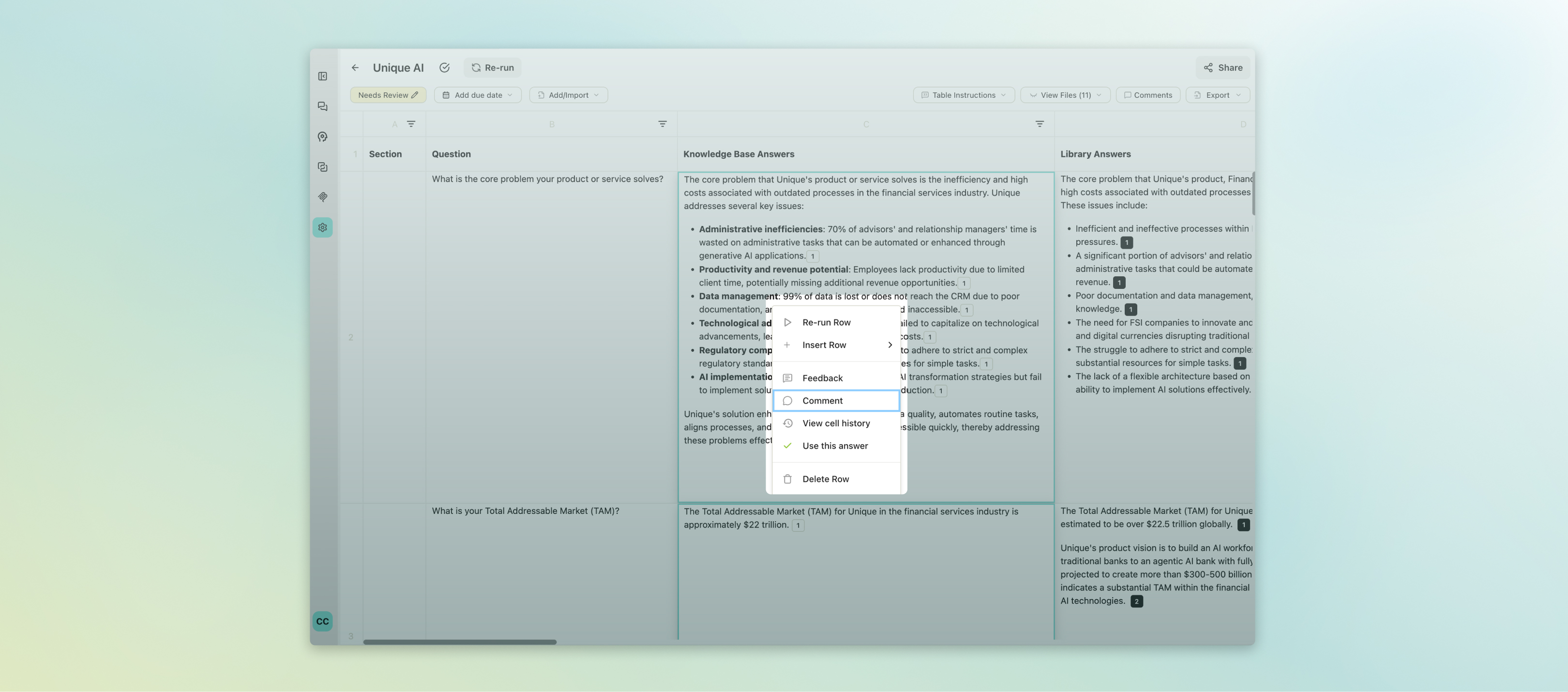
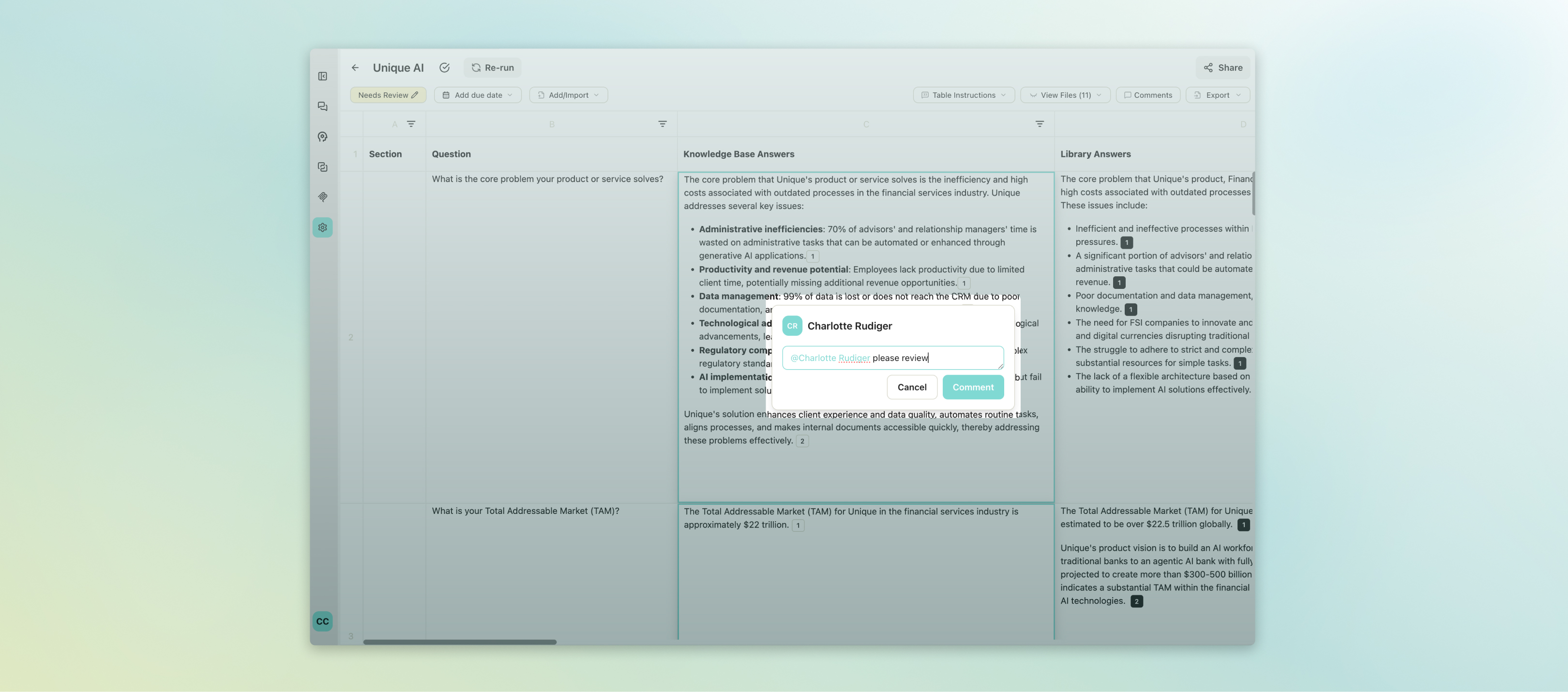
For teams using MCP connectors — integrations that connect the chat to external services such as CRM systems, document repositories, or communication tools — these are now accessible directly from the user settings menu across all apps. Users can view available servers and connect or disconnect at any time, without needing admin assistance.
.jpg?width=3240&height=1430&name=Mai%2026%20-%20MCP%20Connectors%20(1).jpg)
A new Web Search Query Review (Beta) capability adds a user-approval step before any external web search is executed. This is an important safeguard for financial professionals: it ensures that no sensitive query terms are inadvertently sent to external search providers without explicit confirmation, giving teams greater control over what leaves the platform.
.jpg?width=3240&height=1430&name=Mai%2026%20-%20Web%20Search%20Query%20Review%20(1).jpg)
A significant new capability arriving this month is Skills — a way to give AI assistants task-specific instructions that are loaded only when needed, rather than permanently included in the space prompt. Users invoke a skill by typing /skill-name in the chat input or by selecting it from the prompt menu; the assistant then applies those targeted instructions only for that interaction.
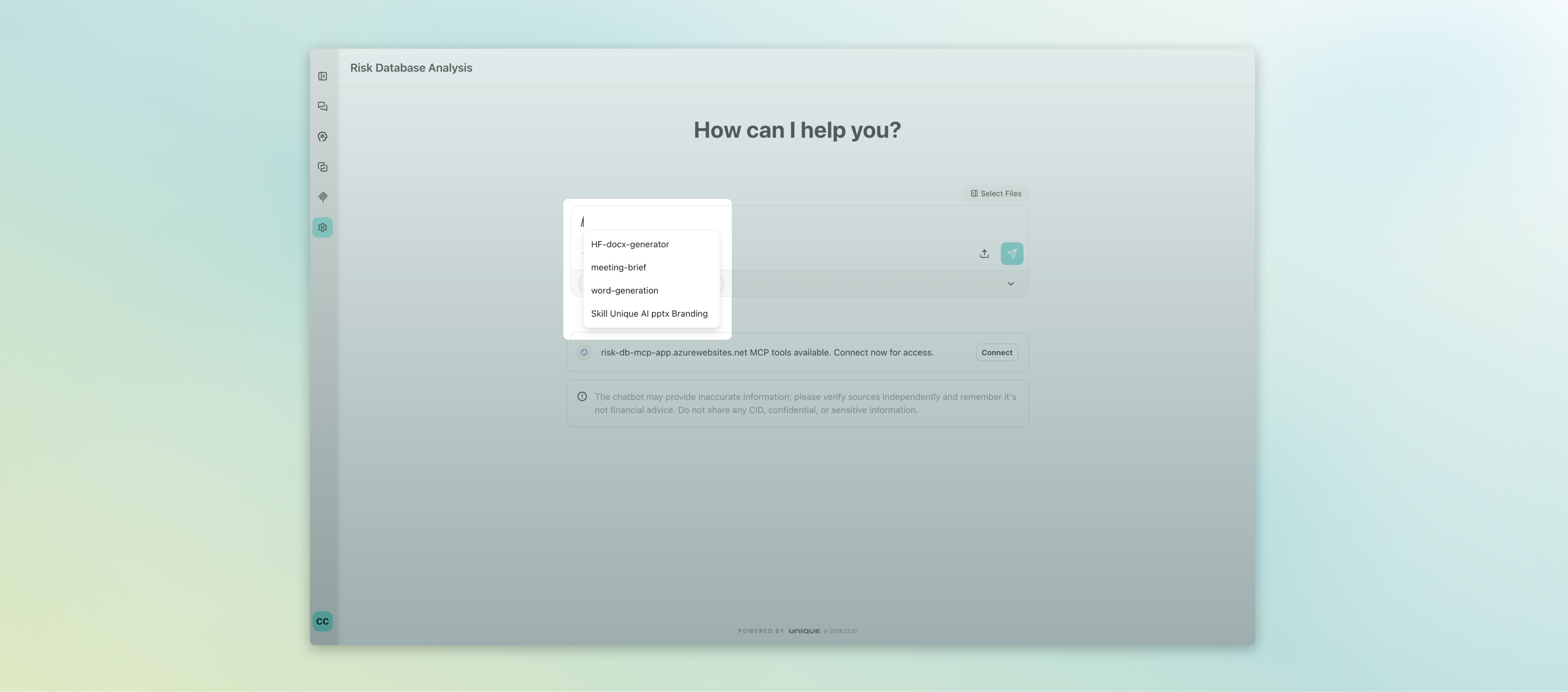
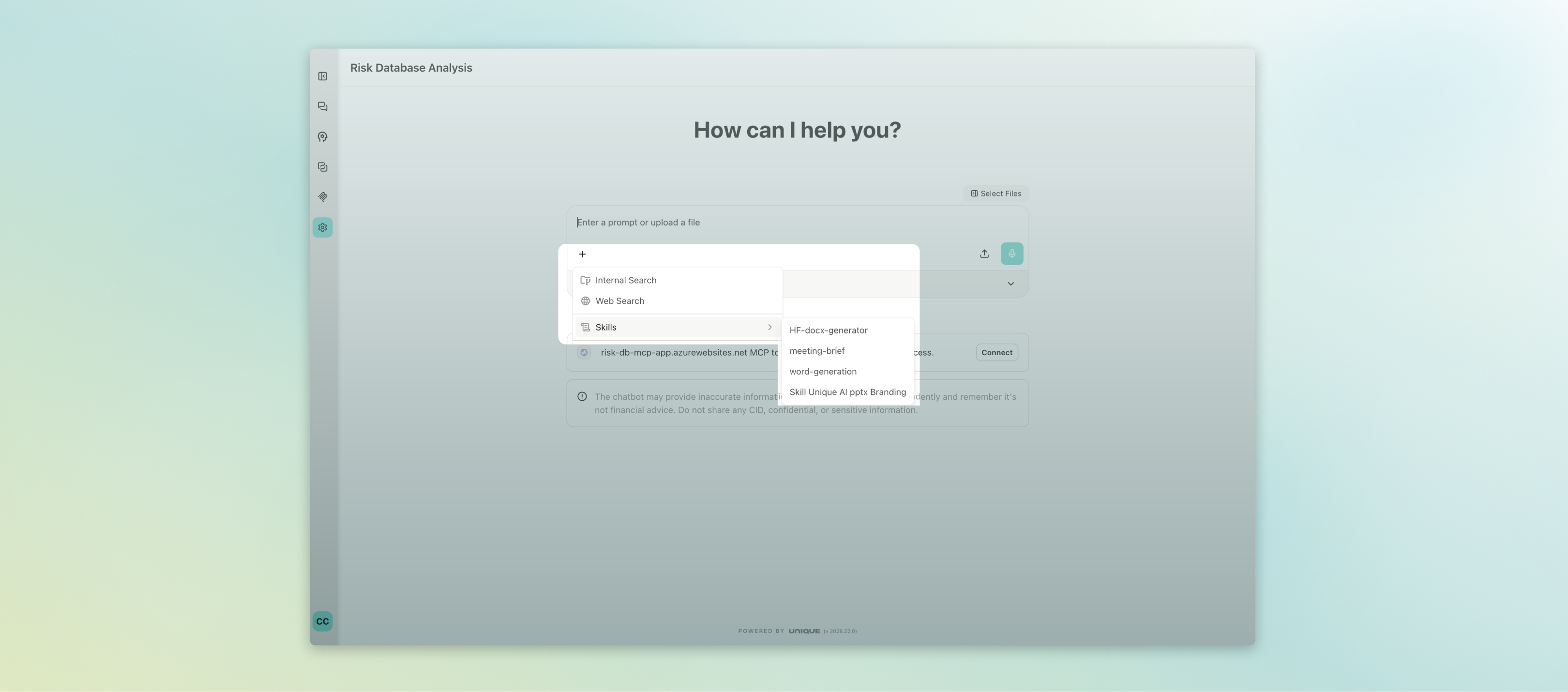
Platform Reliability and Administrator Improvements
Under the hood, release 2026.22 completes a full migration to Node.js 24 on Debian 13 across all backend services, alongside an upgrade to Next.js 15 on the chat application. These changes bring faster startup times, smaller container footprints, and long-term runtime stability — without any impact on day-to-day usage.
LiteLLM — the AI gateway that connects Unique to approved model providers beyond Azure OpenAI, including Google Cloud Vertex AI — is now generally available. For Unique SaaS clients, Unique manages provider setup and compliance controls; self-hosted clients handle their own onboarding. This opens the door to a wider range of enterprise-grade models within the same governed environment.
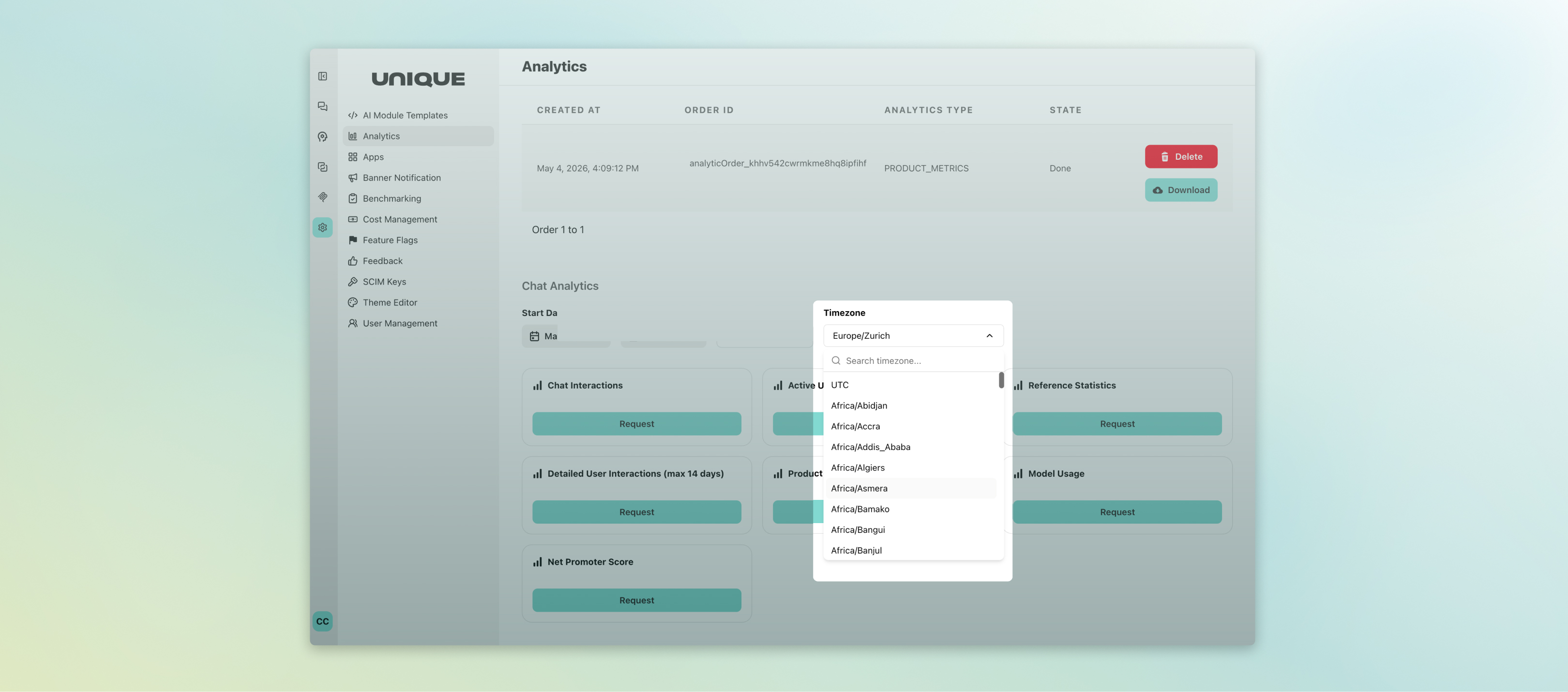
Platform administrators can now generate analytics reports in a user-defined timezone, so usage data reflects local business hours rather than always defaulting to UTC. This simplifies reporting across teams in different regions and makes audit data easier to interpret.
Two new language models have been added to the platform: GPT-5.4 and GPT-5.5, both available as DataZoneStandard deployments via Azure with EU data residency. These models appear in the model selection dropdown once deployed, giving administrators access to the latest OpenAI capabilities within Unique's existing compliance framework.
As always, these updates reflect our commitment to making Unique AI a platform that financial professionals can rely on for serious, everyday work — whether that's processing client documents, running structured analysis, or staying on top of what the AI is doing on your behalf. If you have questions about any of the features covered here, or would like to discuss enabling a specific capability for your team, please reach out to your Customer Success contact.

Unique AI Release Notes: May 2026
Releases 2026.20 and 2026.22 bring a meaningful set of improvements to the Unique AI platform this month. Three themes stand out: a redesigned chat experience that makes daily work faster and easier to navigate, new smarter data-handling capabilities that reduce manual effort across files and structured tables, and important platform infrastructure upgrades that keep the platform secure, fast, and future-ready.
A Refreshed Chat Experience — Cleaner, Faster, More Intuitive
The most visible change this month is a comprehensive UI refresh of the Chat interface, which is now generally available. The new layout has been designed with one goal in mind: getting answers faster with less friction. The welcome screen greets you with a simple “How can I help you?” prompt, removing visual clutter so you can focus on your question right away.
Conversations are now easier to read at a glance. Your messages appear as a bubble on the right; AI responses remain flat on the left — a familiar, natural question-and-answer flow. Sources and file references now appear as compact, clickable badges directly below each answer rather than as separate blocks. A single unified action row (copy, feedback, references, debug) sits below each AI response, and clicking any of these opens a side panel — so you never lose your place in the conversation.
Tables in responses now include a one-click copy button, making it fast to pull data into Excel or another tool. A redesigned hallucination indicator replaces the previous Answer Assessment button: it only appears when the model flags a potential inaccuracy, floating in the lower right with a colour code (yellow for moderate, red for severe) so important warnings stay visible even as you scroll.
The chat input area has also been tidied up — upload, voice, and tool-selection controls are now inside the input box, and prompts are accessible from a compact bar below it. MCP tools are grouped in a "+" menu for easier navigation.
Alongside the chat refresh, a Today's Briefing feature allows AI assistants to greet users with a rich-text summary and a set of clickable suggested prompts when they open a space. This is particularly powerful for use cases where teams want to surface daily priorities or recommended next steps the moment someone logs in.
Smarter Handling of Files, Tables, and External Connections
Working with Excel and CSV files is now more intelligent. When an assistant has code execution enabled, uploaded spreadsheets are automatically routed to the code interpreter rather than the document ingestion pipeline — meaning the AI can perform calculations, filter data, and produce outputs directly, without unnecessary processing in the background.
In the Unique AI Table — the platform's structured Q&A grid used for RFPs, due diligence questionnaires, and data extraction — two improvements make working at scale more reliable. A verbatim question import mode now lets you upload a CSV or XLSX and have questions imported exactly as written, without relying on AI extraction. This is ideal for highly structured templates where wording precision matters.
Excel exports of Unique AI Tables (Beta) can now be configured to strip inline reference markers (such as [1], [2]) from answer columns, delivering clean, professional output ready for sharing with clients or regulators. A bug that caused large tables (200+ rows) to display only the first 20 rows on creation has also been fixed — all rows now appear immediately.
For teams using MCP connectors — integrations that connect the chat to external services such as CRM systems, document repositories, or communication tools — these are now accessible directly from the user settings menu across all apps. Users can view available servers and connect or disconnect at any time, without needing admin assistance.
A new Web Search Query Review (Beta) capability adds a user-approval step before any external web search is executed. This is an important safeguard for financial professionals: it ensures that no sensitive query terms are inadvertently sent to external search providers without explicit confirmation, giving teams greater control over what leaves the platform.
A significant new capability arriving this month is Skills — a way to give AI assistants task-specific instructions that are loaded only when needed, rather than permanently included in the space prompt. Users invoke a skill by typing /skill-name in the chat input or by selecting it from the prompt menu; the assistant then applies those targeted instructions only for that interaction.
Platform Reliability and Administrator Improvements
Under the hood, release 2026.22 completes a full migration to Node.js 24 on Debian 13 across all backend services, alongside an upgrade to Next.js 15 on the chat application. These changes bring faster startup times, smaller container footprints, and long-term runtime stability — without any impact on day-to-day usage.
LiteLLM — the AI gateway that connects Unique to approved model providers beyond Azure OpenAI, including Google Cloud Vertex AI — is now generally available. For Unique SaaS clients, Unique manages provider setup and compliance controls; self-hosted clients handle their own onboarding. This opens the door to a wider range of enterprise-grade models within the same governed environment.
Platform administrators can now generate analytics reports in a user-defined timezone, so usage data reflects local business hours rather than always defaulting to UTC. This simplifies reporting across teams in different regions and makes audit data easier to interpret.
Two new language models have been added to the platform: GPT-5.4 and GPT-5.5, both available as DataZoneStandard deployments via Azure with EU data residency. These models appear in the model selection dropdown once deployed, giving administrators access to the latest OpenAI capabilities within Unique's existing compliance framework.
As always, these updates reflect our commitment to making Unique AI a platform that financial professionals can rely on for serious, everyday work — whether that's processing client documents, running structured analysis, or staying on top of what the AI is doing on your behalf. If you have questions about any of the features covered here, or would like to discuss enabling a specific capability for your team, please reach out to your Customer Success contact.