Releases 2026.24 and 2026.26 bring a practical set of improvements to the Unique AI platform this month. Three themes stand out: smoother handling of files and chat, a more polished and reliable Agentic Table experience, and important platform administration refinements that give teams greater confidence in how Unique AI is configured and maintained.
Smoother File and Chat Handling
Day-to-day interactions with the platform are noticeably tidier this month. You can now remove uploaded files from a chat at any point before sending — including while a file is still being ingested. Hovering over the attachment and clicking the remove icon now takes it out cleanly, giving you full control over what you send.
Chat titles are now updated based on your first prompt when you start a conversation by uploading a file — so conversations are labelled meaningfully rather than inheriting the file name.
For teams managing shared workspaces, Word and PowerPoint documents now ingest reliably across all platform configurations.
On the Knowledge Base side, folder names can no longer contain forward slashes. This prevents ambiguity with folder path navigation and users now see clear validation before an unsupported name is saved.
A More Reliable and Professional Agentic Table
The Agentic Table — used across due diligence questionnaires, RFPs, and structured data extraction — receives several fixes and quality improvements that make working with it at scale more dependable.
Excel exports are cleaner and easier to read. Column widths now auto-size to fit their content in exported files, restoring a behaviour that had been inadvertently broken in a recent update. Separately, hidden sheets, rows, and columns in uploaded Excel files are no longer imported as spurious questions when extracting a question list — reducing noise when your source template contains hidden formatting rows or administrative tabs.
When rows from an Agentic Table sheet are saved to the Answer Library, each file is now named with the original sheet name, the ingestion date and time, and an index — for example, DDQ_Q1_2026_20260520_1430_1. This ties library entries back to their source and keeps names unique when the same sheet is ingested more than once, making it straightforward to trace where any given answer originated.
A security fix ensures that due date updates on Agentic Table sheets now correctly verify the caller has the right access before applying changes. And a correction to how currency values render in AI responses means that figures such as "$10 to $20" no longer get misread as LaTeX formulas — a small but meaningful fix for financial content.
Platform Administration Improvement
Administrators benefit from a set of refinements that make the platform easier to manage and monitor.
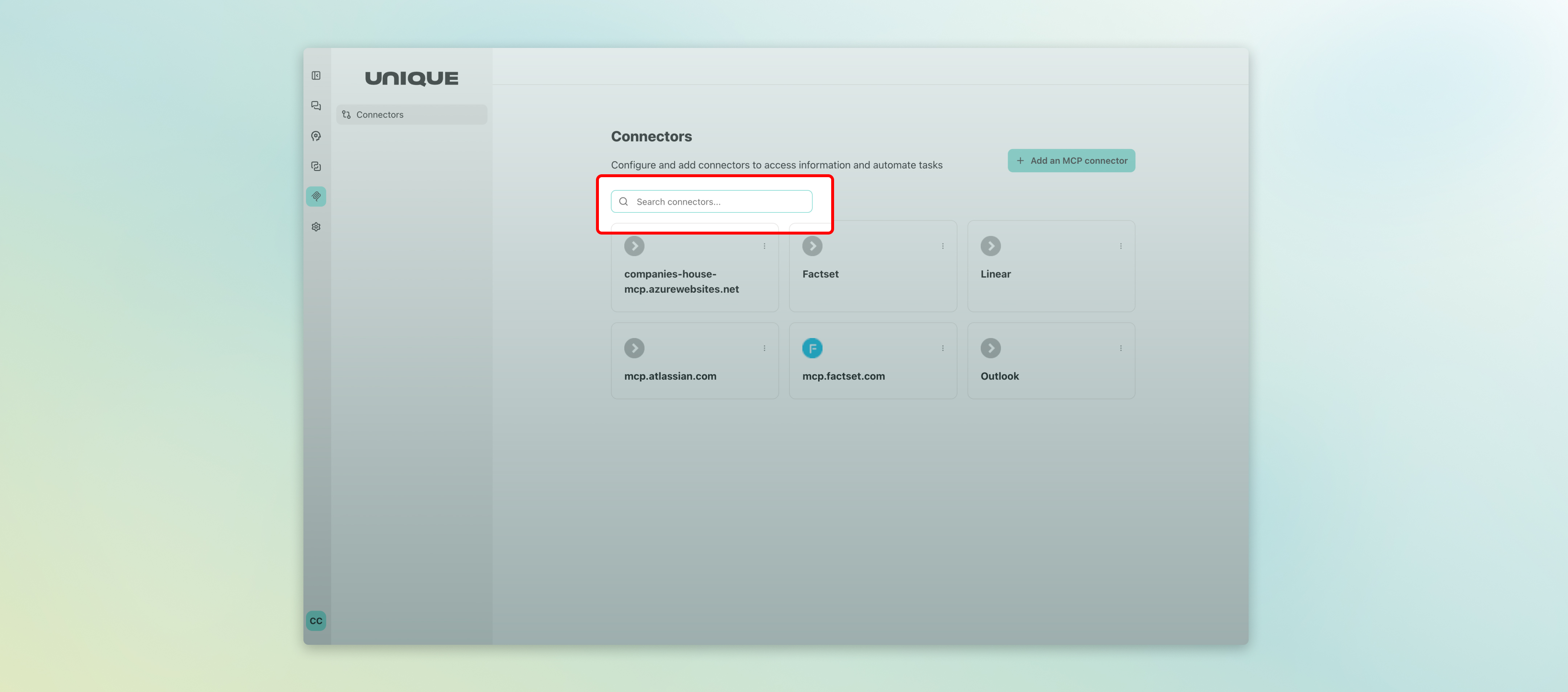
MCP Connectors — the integrations that link Unique AI to external services are now searchable in the admin interface and displayed in alphabetical order. This makes it significantly faster to locate a specific connector in environments with many integrations configured.
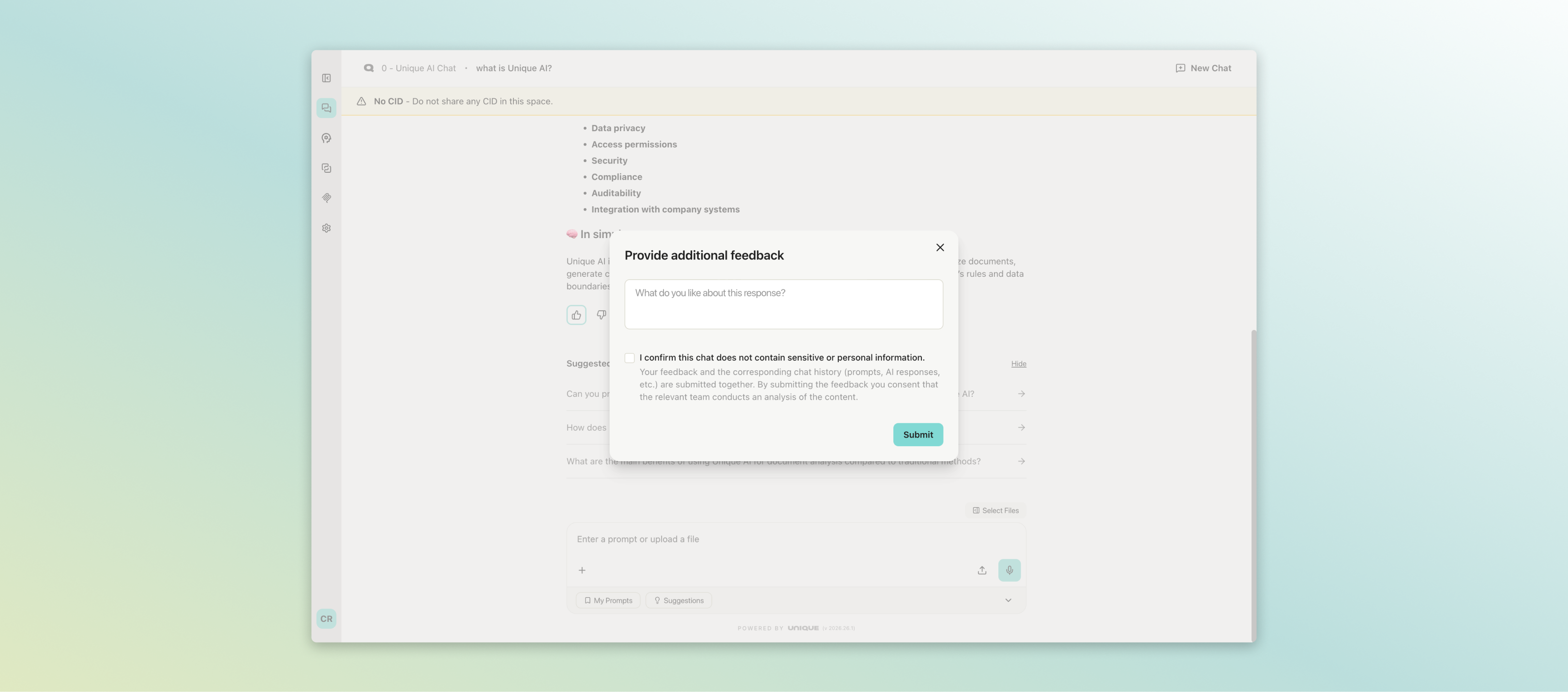
The feedback modal has been redesigned to meet the latest design standards. User prompt and AI response content is now always included in feedback CSV exports, and an optional sensitive content consent checkbox can be enabled per company, letting users confirm before sensitive information is shared as part of a feedback submission.
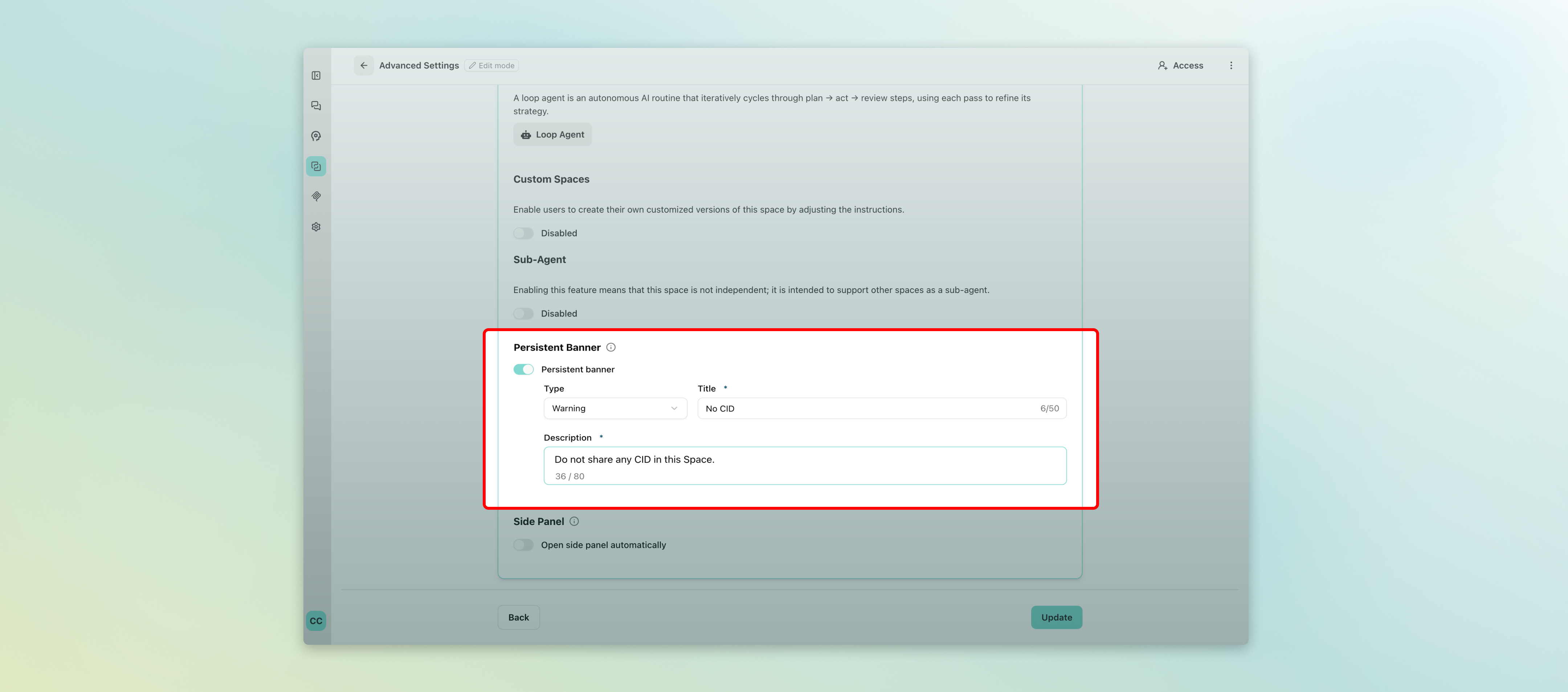
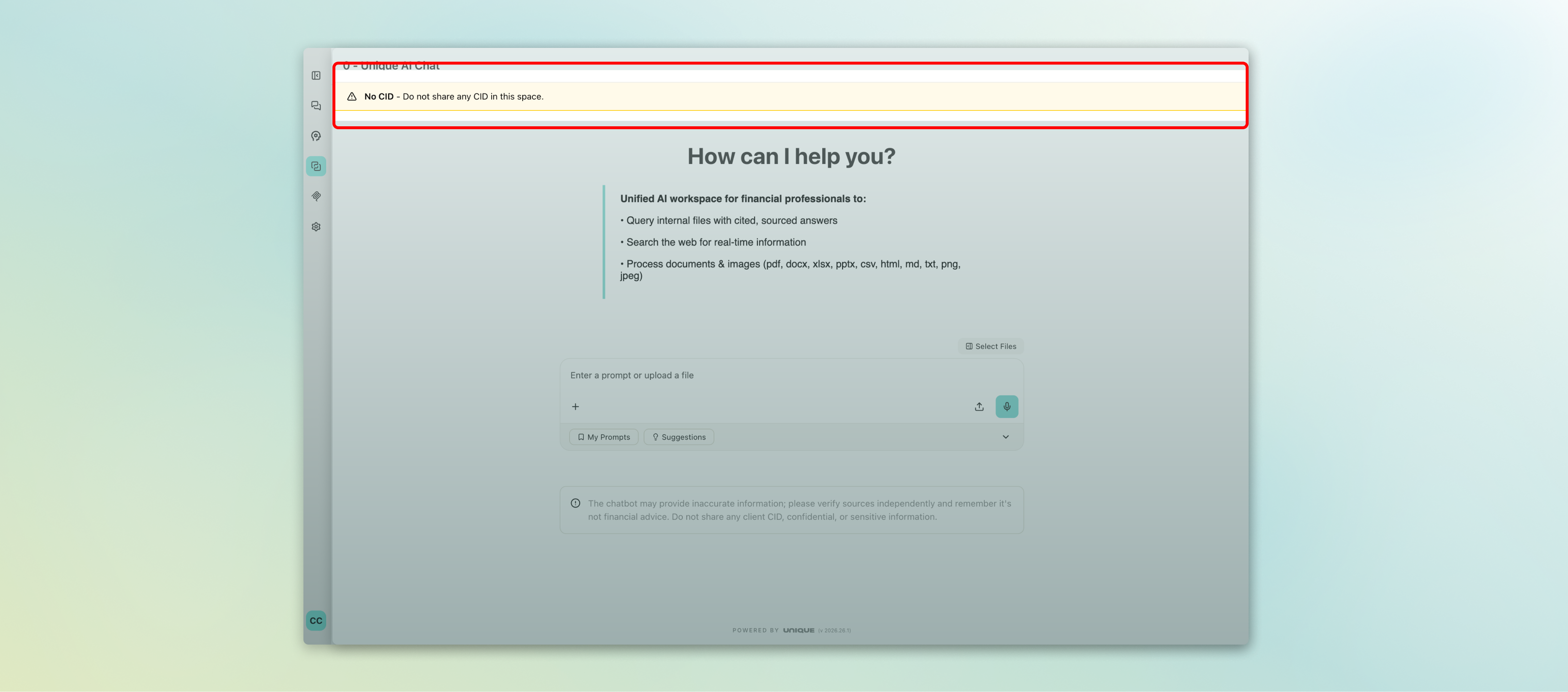
The persistent notification banner has moved to Advanced Settings and now appears below the header for improved visibility. Date pickers for banner scheduling have been tightened: they now prevent past start dates, enforce valid date ranges, and normalise start and end times automatically — making it reliable to schedule announcements for a specific day or period.
Finally, Claude Opus 4.8 is now available through LiteLLM — accessible via the Anthropic API directly or through VertexAI with EU data residency. This gives administrators a high-capability model option within the platform’s existing compliance and governance framework.
What’s coming next
We are also working on some exciting upcoming features, including the ability to switch AI models directly within a conversation to match the right tool to each task, an expanded side panel for code execution results that makes charts, tables, and documents easier to review, daily model usage limits to give organisations tighter control over AI spend, and a new row-scoped access role in the Agentic Table that lets specific users contribute answers on only the rows assigned to them. Stay tuned for more details as these capabilities move towards general availability.
These updates reflect our ongoing commitment to making Unique AI a platform financial professionals can rely on for serious, everyday work. If you have questions about any of the features covered here, or would like to discuss enabling a specific capability for your team, please reach out to your Customer Success contact.

Unique AI Release Notes: June 2026
Releases 2026.24 and 2026.26 bring a practical set of improvements to the Unique AI platform this month. Three themes stand out: smoother handling of files and chat, a more polished and reliable Agentic Table experience, and important platform administration refinements that give teams greater confidence in how Unique AI is configured and maintained.
Smoother File and Chat Handling
Day-to-day interactions with the platform are noticeably tidier this month. You can now remove uploaded files from a chat at any point before sending — including while a file is still being ingested. Hovering over the attachment and clicking the remove icon now takes it out cleanly, giving you full control over what you send.
Chat titles are now updated based on your first prompt when you start a conversation by uploading a file — so conversations are labelled meaningfully rather than inheriting the file name.
For teams managing shared workspaces, Word and PowerPoint documents now ingest reliably across all platform configurations.
On the Knowledge Base side, folder names can no longer contain forward slashes. This prevents ambiguity with folder path navigation and users now see clear validation before an unsupported name is saved.
A More Reliable and Professional Agentic Table
The Agentic Table — used across due diligence questionnaires, RFPs, and structured data extraction — receives several fixes and quality improvements that make working with it at scale more dependable.
Excel exports are cleaner and easier to read. Column widths now auto-size to fit their content in exported files, restoring a behaviour that had been inadvertently broken in a recent update. Separately, hidden sheets, rows, and columns in uploaded Excel files are no longer imported as spurious questions when extracting a question list — reducing noise when your source template contains hidden formatting rows or administrative tabs.
When rows from an Agentic Table sheet are saved to the Answer Library, each file is now named with the original sheet name, the ingestion date and time, and an index — for example, DDQ_Q1_2026_20260520_1430_1. This ties library entries back to their source and keeps names unique when the same sheet is ingested more than once, making it straightforward to trace where any given answer originated.
A security fix ensures that due date updates on Agentic Table sheets now correctly verify the caller has the right access before applying changes. And a correction to how currency values render in AI responses means that figures such as "$10 to $20" no longer get misread as LaTeX formulas — a small but meaningful fix for financial content.
Platform Administration Improvement
Administrators benefit from a set of refinements that make the platform easier to manage and monitor.
MCP Connectors — the integrations that link Unique AI to external services are now searchable in the admin interface and displayed in alphabetical order. This makes it significantly faster to locate a specific connector in environments with many integrations configured.
The feedback modal has been redesigned to meet the latest design standards. User prompt and AI response content is now always included in feedback CSV exports, and an optional sensitive content consent checkbox can be enabled per company, letting users confirm before sensitive information is shared as part of a feedback submission.
Finally, Claude Opus 4.8 is now available through LiteLLM — accessible via the Anthropic API directly or through VertexAI with EU data residency. This gives administrators a high-capability model option within the platform’s existing compliance and governance framework.
What’s coming next
We are also working on some exciting upcoming features, including the ability to switch AI models directly within a conversation to match the right tool to each task, an expanded side panel for code execution results that makes charts, tables, and documents easier to review, daily model usage limits to give organisations tighter control over AI spend, and a new row-scoped access role in the Agentic Table that lets specific users contribute answers on only the rows assigned to them. Stay tuned for more details as these capabilities move towards general availability.
These updates reflect our ongoing commitment to making Unique AI a platform financial professionals can rely on for serious, everyday work. If you have questions about any of the features covered here, or would like to discuss enabling a specific capability for your team, please reach out to your Customer Success contact.