This edition covers releases 2026.42 and 2026.44, rolled out across October. The month brings more choice and control in Conduct, an easier way to work together, and a cleaner, faster Knowledge Base, plus a strong new wave of AI models.
More Choice and Control in Unique AI Conduct
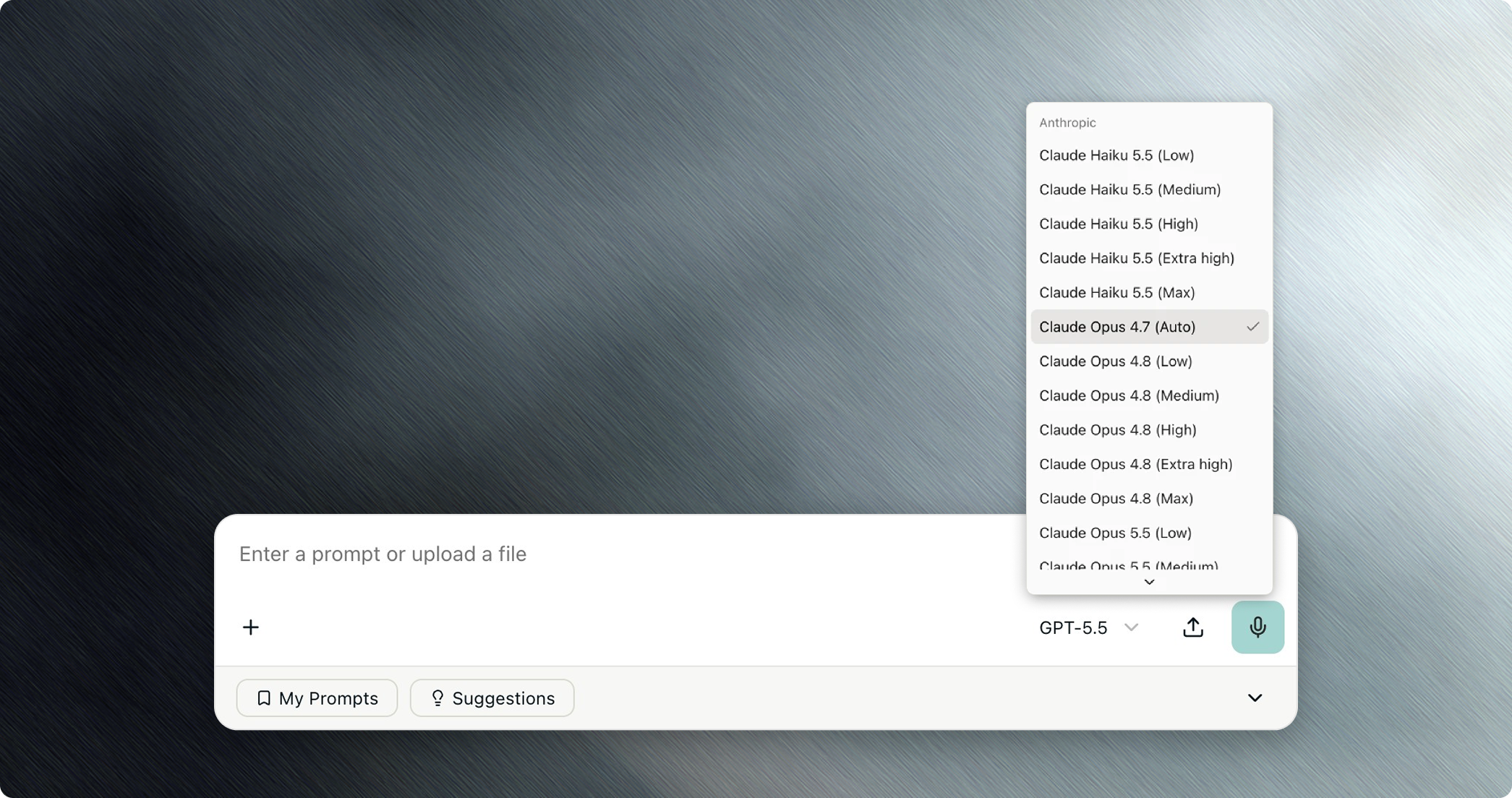
You can now pick the model and effort level per message in Conduct. In spaces that allow it, the model list shows each option clearly, such as GPT-5 (Low) or GPT-5 (High), so you can use a lighter setting for quick questions and a more thorough one for complex analysis. If a model can't run at the effort you chose, Conduct steps down to the next allowed level instead of stopping.
Documents are more faithful to your brand. Conduct now produces ordinary Word and PDF files straight away and asks for your company template only when it matters, for example when a document is client-facing. When it does use a template, it keeps your cover, headers, footers, fonts and logos intact, and checks the result for leftover placeholder text, missing values and missing German, French or Spanish accents before handing it over.
Answers are also easier to trust: the hallucination check now flags contradictions, marking an answer in red when a statement disagrees with a cited source. And personal skills you create are now saved privately, so only you can use them.
Working Together, Made Easier
Three collaboration features are now generally available. Pinned chats keep your most important conversations at the top of your list. Shared Chats are on by default for every company, so you can share a conversation with a colleague in a couple of clicks. And Context Memory lets the assistant remember useful context across chats, switched on per space by your administrators, with an opt-out for every user.
The new answer layout and interactive HTML previews are now on in every chat. Previews can even work with your data: start chats, send messages and create files where you have access. When something goes wrong, the chat now explains why in plain terms, such as a rate limit or a provider outage, instead of a generic error.
A Cleaner, Faster Knowledge Base
The redesigned Knowledge Base is now on by default, with new list, search and column views that make it easier to find what you need. Deleted files can be restored for your company's retention period, and searches that filter by folder on large knowledge bases now complete reliably.
Smoother Collaboration in Agentic Table
Everyone on a sheet now sees the new multi-assignee column, with stacked initials and names on hover. Collaborators with write access can upload and manage source files, not just the owner. New sheets use smarter question extraction, keeping sub-questions inside their parent question, so long questionnaires produce fewer, cleaner rows. Adding a row to the Answer Library twice now updates the existing entry instead of creating a duplicate, and citations are kept only when the person saving can open the source.
Expanded Access to the Latest AI Models
The Claude 5.5 family has arrived: Claude Opus 5.5, Sonnet 5.5 and Haiku 5.5 are available via Anthropic and Vertex AI, alongside GPT-6.1 Sol (via Azure) and Gemini 4 Argon (via Google and Vertex AI). If your company keeps an allowed-model list, add new models there first. Ahead of Microsoft retiring its o-series models on November 19, spaces using them are moved automatically to GPT 5.6 Sol and GPT 5.6 Terra. No action is needed on your end. Here is our model & harness evaluation update on these new models.
For Platform Administrators
MCP is now generally available and always on for every company, so connected tools are available in chat and admin. Admins set each Conduct space's default model and effort and decide which alternatives users can switch to, and a new company templates folder gives one home to the document templates Conduct uses. Cost Management now breaks costs down per user, Benchmark alerts can arrive by email, and word replacements for voice input make sure domain terms are always transcribed correctly.
Two heads-ups: Agentic Table Word exports are now private to the person who created them, and deployments using Virtual Servers need a new company setting to keep those pages visible. Your customer success contact can help with both.
What's Coming Next
Several exciting features are already in Beta or early testing. Pi Agent is a new Conduct agent that runs on models from many providers, including open models you can host yourself, helping you lower token costs and keep confidential data on your own infrastructure. You'll also be able to stop a running Agentic Table, give spaces your own personal dashboard in the side panel, and open a cited file straight to the right pages.
As always, these updates roll out automatically, with nothing for your team to install. If you'd like a walkthrough of model choice in Conduct, Context Memory or any of these features, or want to try one that isn't yet active in your workspace, reach out to your customer success contact.

What's New in Unique AI in November 2026
This edition covers releases 2026.42 and 2026.44, rolled out across October. The month brings more choice and control in Conduct, an easier way to work together, and a cleaner, faster Knowledge Base, plus a strong new wave of AI models.
More Choice and Control in Unique AI Conduct
You can now pick the model and effort level per message in Conduct. In spaces that allow it, the model list shows each option clearly, such as GPT-5 (Low) or GPT-5 (High), so you can use a lighter setting for quick questions and a more thorough one for complex analysis. If a model can't run at the effort you chose, Conduct steps down to the next allowed level instead of stopping.
Documents are more faithful to your brand. Conduct now produces ordinary Word and PDF files straight away and asks for your company template only when it matters, for example when a document is client-facing. When it does use a template, it keeps your cover, headers, footers, fonts and logos intact, and checks the result for leftover placeholder text, missing values and missing German, French or Spanish accents before handing it over.
Answers are also easier to trust: the hallucination check now flags contradictions, marking an answer in red when a statement disagrees with a cited source. And personal skills you create are now saved privately, so only you can use them.
Working Together, Made Easier
Three collaboration features are now generally available. Pinned chats keep your most important conversations at the top of your list. Shared Chats are on by default for every company, so you can share a conversation with a colleague in a couple of clicks. And Context Memory lets the assistant remember useful context across chats, switched on per space by your administrators, with an opt-out for every user.
The new answer layout and interactive HTML previews are now on in every chat. Previews can even work with your data: start chats, send messages and create files where you have access. When something goes wrong, the chat now explains why in plain terms, such as a rate limit or a provider outage, instead of a generic error.
A Cleaner, Faster Knowledge Base
The redesigned Knowledge Base is now on by default, with new list, search and column views that make it easier to find what you need. Deleted files can be restored for your company's retention period, and searches that filter by folder on large knowledge bases now complete reliably.
Smoother Collaboration in Agentic Table
Everyone on a sheet now sees the new multi-assignee column, with stacked initials and names on hover. Collaborators with write access can upload and manage source files, not just the owner. New sheets use smarter question extraction, keeping sub-questions inside their parent question, so long questionnaires produce fewer, cleaner rows. Adding a row to the Answer Library twice now updates the existing entry instead of creating a duplicate, and citations are kept only when the person saving can open the source.
Expanded Access to the Latest AI Models
The Claude 5.5 family has arrived: Claude Opus 5.5, Sonnet 5.5 and Haiku 5.5 are available via Anthropic and Vertex AI, alongside GPT-6.1 Sol (via Azure) and Gemini 4 Argon (via Google and Vertex AI). If your company keeps an allowed-model list, add new models there first. Ahead of Microsoft retiring its o-series models on November 19, spaces using them are moved automatically to GPT 5.6 Sol and GPT 5.6 Terra. No action is needed on your end. Here is our model & harness evaluation update on these new models.
For Platform Administrators
MCP is now generally available and always on for every company, so connected tools are available in chat and admin. Admins set each Conduct space's default model and effort and decide which alternatives users can switch to, and a new company templates folder gives one home to the document templates Conduct uses. Cost Management now breaks costs down per user, Benchmark alerts can arrive by email, and word replacements for voice input make sure domain terms are always transcribed correctly.
Two heads-ups: Agentic Table Word exports are now private to the person who created them, and deployments using Virtual Servers need a new company setting to keep those pages visible. Your customer success contact can help with both.
What's Coming Next
Several exciting features are already in Beta or early testing. Pi Agent is a new Conduct agent that runs on models from many providers, including open models you can host yourself, helping you lower token costs and keep confidential data on your own infrastructure. You'll also be able to stop a running Agentic Table, give spaces your own personal dashboard in the side panel, and open a cited file straight to the right pages.
As always, these updates roll out automatically, with nothing for your team to install. If you'd like a walkthrough of model choice in Conduct, Context Memory or any of these features, or want to try one that isn't yet active in your workspace, reach out to your customer success contact.